
An AI agent can now work the screens of software that was never connected, on a Cloud PC your IT team manages. Here is what that means for the office around the plant.
Somewhere in your office, someone has an email open on one monitor and the ERP open on the other. A customer’s purchase order arrived as a PDF, and they are typing it into the order screen line by line. Down the hall, someone else is copying tracking numbers from a carrier’s website into a spreadsheet. The work is simple. People do it because nobody connected the two systems, and an integration project never looked worth the cost.
A computer use agent does that work the way the person does. It is an AI agent that looks at the screen, decides what to do next, and clicks and types. It needs no API and no custom integration, because it uses the application through the same screens your people use. Microsoft made the capability generally available in Copilot Studio in May 2026. Microsoft also sells Windows 365 for Agents, a service that gives the agent a Cloud PC to work on. As Microsoft put it at Ignite this month: “Some agents need a computer of their own.”
What a computer use agent does
Automation between two systems has usually started with an API, the route by which one program calls another, and a developer to wire it up. For software with no API, the standard answer has been robotic process automation (RPA): a recorded script that replays the same clicks in the same places. A script runs fast until a screen changes, and then it stops. Low-volume and irregular work never justified an API project or a script, so people kept doing it.
A computer use agent takes instructions in plain language, the way you would brief a new coordinator: where orders arrive, which screen they go into, what to do when a part number is not found. When it runs, it repeats a loop that Microsoft’s documentation describes in three steps. The agent takes a screenshot, a model reads the screen and decides the next action, and the agent clicks, types, or scrolls. Then it takes the next screenshot.
Because the agent reads the screen every time, a button that moved does not stop it the way it stops a script. When a value is missing or the instructions could be read two ways, it can pause and send a question to a person. That reviewer answers by email or in Copilot Studio, and the agent resumes from the step where it stopped.
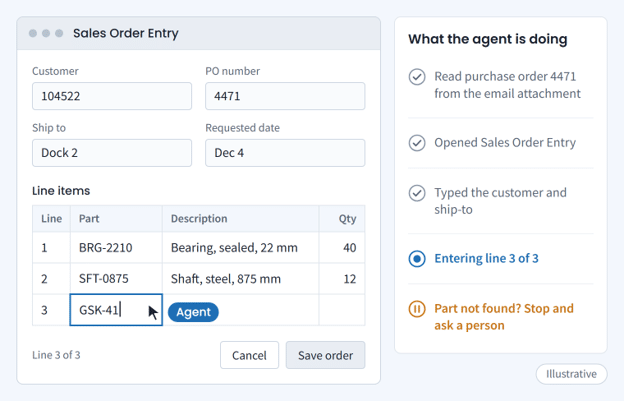
Figure 1. An agent partway through an order (illustrative). It works the same screen a coordinator would, one step at a time, and can pause to ask a person when a value is missing.
A PC of its own
An agent that clicks and types needs a Windows desktop to work on. Windows 365 for Agents supplies one: a Cloud PC in Microsoft’s cloud. The agent checks a Cloud PC out of a pool when it has a task, and the Cloud PC is reset when the task ends. You do not have to set aside a laptop or a spare PC in the office for it.
Microsoft sets the agent up much as your IT team sets up a new coordinator, who gets a user account, a company PC, and access to the systems the job requires. The agent gets its equivalents through the tools your IT team already runs:
An identity. The agent signs in to the Cloud PC with a Microsoft Entra account. In Copilot Studio, that is the account that owns the agent’s connection, so create the connection with an account that has only the access the task needs. Agents run through Microsoft Agent 365 get a dedicated Entra agent user, separate from human users, and Conditional Access can block one whose Cloud PC falls out of compliance.
A managed PC. Each Cloud PC is joined to Entra and managed in Intune, in Microsoft’s words, “like any other PC in your fleet.” Your IT team manages it in the same Intune console as the Cloud PCs assigned to people.
A record of its work. Copilot Studio keeps a step-by-step log of each run, with a screenshot for each action, that a person can page through afterward.
For an IT or security leader, that puts the agent under controls the company already operates.
For the person who builds the agent, setup is light. Your IT administrator first configures Entra and Intune for Cloud PC pools, once for the tenant. Jon Jarvis, a Microsoft MVP who has built these agents, describes the infrastructure work in Copilot Studio as naming a pool of Cloud PCs and waiting up to 30 minutes: “No image, no networking, no VM sizing.” That Cloud PC pool is in preview, and it scales on its own up to 10 Cloud PCs.
If your ERP client runs inside your plant’s network, the Cloud PC needs a way in. In the week of November 16, Microsoft released a preview for that case. Agent users on Windows 365 for Agents Cloud PCs can now securely access “on-premises apps, including legacy apps that don’t have APIs.” Microsoft’s setup guide starts from a Cloud PC pool that IT creates with a provisioning policy. Copilot Studio can also run the agent on a Windows machine that you own and manage.
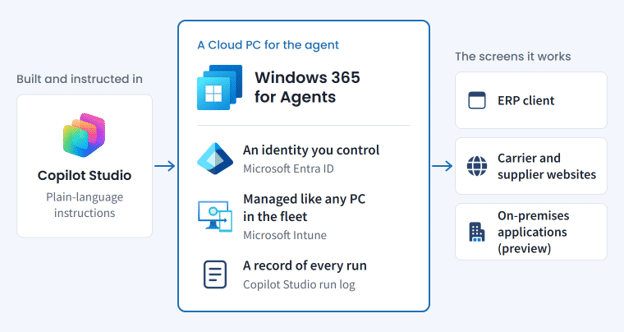
Figure 2. The Microsoft stack for computer use. The agent is built in Copilot Studio and works on a Cloud PC from Windows 365 for Agents, with an identity, device management, and a record of every run.
Where it earns its place in a manufacturer
The fit is the office around the plant: customer service, purchasing, and logistics. The work that suits an agent is data entry or lookup in a system with no usable API. As a rough guide, the volume is a few dozen to a few hundred items a day.
| VERDICT | WORK | WHY |
| Fits | Customer orders from email or a portal, keyed into the ERP | No usable API. A person handles the exceptions. |
| Fits | Shipment status from carrier websites, written back to the ERP | Websites you do not own, one per carrier. |
| Fits | Lookups and updates on supplier and customer portals | Portals you do not control, each with its own screens. |
| Conditional | Reconciliation between two systems | Works with a person approving each result. |
| Conditional | High-volume work on a screen that rarely changes | A script is usually cheaper at that volume. |
| Never | Any system with a working API or connector | Use the API. It is faster and cheaper. |
| Never | Payments and other financial transactions | Microsoft says the tool is not intended for them. |
| Never | HMI and SCADA screens, or anything that touches a machine | Keep agents in the business systems. |
Table 1. Where computer use fits in a manufacturer.
The early examples follow this pattern. Microsoft says its own business operations team uses Windows 365 for Agents to process orders and has “cut processing time by 60%.” Graebel, a relocation company that Microsoft named when it announced general availability, runs an agent that reads service order emails, checks each one against business rules, and enters the data through the screen of a platform that could not support an API integration. Low-confidence cases go to a person. Among manufacturers, the startup Automat reports that its agents at ABB export open shipments from SAP, check the websites of seven carriers for tracking and proof of delivery, and write the results back. Automat says its agents at ABB have returned about a year of one person’s time across four programs.
Each of these examples comes from the company that built or sold the agent. All three describe order handling, lookups, and data entry, which a manufacturer’s office does every day.
What it costs
Microsoft meters the price by the step and by the hour. In Copilot Studio, each step the agent takes costs 5 Copilot Credits on a standard model, and Microsoft’s list price is “$0.01 per credit”: five cents a step. The Cloud PC costs $0.40 an hour in the United States, and Microsoft rounds the agent’s working time up to the next full hour.
Jarvis published the figures from a real run of one of his production agents: 54 steps and 13 minutes 27 seconds, for $2.70 in credits plus $0.40 of Cloud PC time. That is about three dollars for a task of that size.
Compare that with the coordinator’s time. If an order takes a coordinator ten minutes and a loaded hour costs $35, the order costs about $5.80 to key. The $35 is an example, so use your own figure. The agent can also work the queue at night and on the weekend.
Cost grows with every step, so thousands of identical transactions a day belong on a script or an API. Microsoft’s guidance on choosing between an agent and a script recommends RPA for “predictable, high-volume tasks” and says most enterprise automation strategies “should combine both approaches.”
What to know before you hand it real work
It is slower than a person, item by item. Every step is a round trip to a model. Three partners at the investment firm Andreessen Horowitz wrote in August 2026 that “a task someone finishes in two to three minutes can take an agent eight to ten.” Give it a queue that can run in the background.
It can be wrong without knowing it. An agent that misreads a quantity can still finish the order, and that order looks like any other in the ERP. Have a person approve each result. Make the approval a step the agent’s account has no permission to perform, such as the release of the order in the ERP.
It is the third choice. Use an API or a connector wherever one exists, and a script for high-volume work on a screen that never changes. An agent takes the work that neither covers.
Check your sign-in path first. Microsoft notes that stored sign-in “might not be supported” for applications delivered through Citrix or built on Java. If that describes your ERP client, test it before you plan around it.
How to start
Pick one task. Choose a clerical task that someone does every day between two screens, with a clear right answer: orders from a shared mailbox into the ERP, or delivery status from carrier websites.
Run it beside the person. Microsoft gives each tenant 50 free hours of Cloud PC pool usage for published agents. The free hours cover Cloud PC time, so budget for the per-step credits. Let the agent work the same items a person works for a few dozen runs, with a person approving each result. Count the steps, the minutes, and the errors.
Decide on the numbers. If the results match and a run costs less than the coordinator’s time, widen it to the full queue and keep a person on the exceptions. Jarvis recommends Copilot Studio for an organization’s first computer use agent for this reason: “you learn how these agents fail cheaply and quickly.”
To read further: Microsoft’s computer use documentation covers setup and limits, and its guide to choosing between computer use and RPA is short and useful. Automat’s ABB case study shows the work at a manufacturer, by the vendor’s account.
Start with the desk where someone retypes the same kind of order every day. An agent can take that task on a Cloud PC your IT team already knows how to manage.
About the Author
Erik Benjaminson designs and builds agentic AI solutions for Covenant’s enterprise clients, from discovery through production. He has spent nearly 30 years helping organizations get real value from new technology platforms: the commercial web, wireless data, cloud and now AI. That includes 14 years at Microsoft, where he started in the Microsoft Consulting Services (MCS) Advanced Technology group and later led a $65M developer services practice. After Microsoft, he built customer success organizations at NetApp and F5. In 2024 he founded Sapient Technology Group, an applied AI lab. His work there covers multi-agent orchestration, evaluation and observability.